
What is MentorAgent: the AI agents of your applications, under your control
Your systems on one side, your users on the other, and MentorAgent in the middle: governance, specialists and teams, pages and skills, cost control, observability and the model you choose.
![MentorAgent cover: the title What is MentorAgent; your systems (.NET methods with [MentorAction], MCP tools, A2A agents) flow into MentorAgent, with governance, specialists and teams, pages and skills, cost control, observability and cloud or local models, and out to wherever your users are: web, mobile, AI assistants through MCP, other agents through A2A, scripts and services through HTTP and SSE.](blog/what-is-mentoragent/cover-1200.l0twsvh3jj.webp)
In this article
MentorAgent is an open-source library for .NET 10 that puts an AI agent between your systems and your users, and keeps it under your rules. On one side, the agent uses what you already have: the methods of your .NET application, the tools of MCP servers, other agents over A2A. On the other side, your agent and its actions reach people and programs wherever they are: on the web, on mobile, in AI assistants, in other agents, in scripts and services. In the middle, MentorAgent enforces your rules, splits work among specialists and teams, knows the user's page, keeps costs in check, shows what happened and runs the model you choose, in the cloud or local.
MentorAgent at a glance
Section titled “MentorAgent at a glance”- Your systems: .NET methods marked with
[MentorAction], tools from MCP servers, agents reached over A2A. - MentorAgent: six capabilities between the two sides: governance, specialists and teams, pages and skills, cost control, observability, and the model you choose, in the cloud or local.
- Wherever your users are: web and mobile apps, AI assistants through MCP, other agents through A2A, scripts and services through HTTP and Server-Sent Events.
Why MentorAgent
Section titled “Why MentorAgent”A chatbot that answers questions is easy to build. An agent that acts inside a business application is not. As soon as it can change data, the questions change too:
- What can it use: your services, MCP tools, other agents?
- Who may ask for what, and who confirms changes?
- How does it split complex work, and how do you see what it did?
- Which model answers, and what does it cost?
- Where do users meet it: web, mobile, an AI assistant, another system?
MentorAgent answers each of these in your code, not in the prompt.
Your systems: what the agent can use
Section titled “Your systems: what the agent can use”.NET methods
Section titled “.NET methods”The problem. Your services already know how to read an order or issue a refund. Rewriting that logic for an AI framework duplicates it, and the two copies drift apart.
What MentorAgent does. You keep your services. A [MentorAction] attribute marks the methods the agent may use, and one call registers the library, the model and the classes to scan:
using Microsoft.Extensions.AI;
using Novior.MentorAgent.Extensions;
using OpenAI;

var builder = WebApplication.CreateBuilder(args);

// Action classes come from the DI container
builder.Services.AddScoped<IOrderStore, SqlOrderStore>();
builder.Services.AddScoped<OrderService>();

builder.Services.AddMentorAgent(options =>
{
    options.AppName = "ShopFlow back office";
    options.ScanAssemblies = [typeof(Program).Assembly];
    options.ChatClient = new OpenAIClient(builder.Configuration["OpenAI:Key"]!)
        .GetChatClient("gpt-4o-mini")
        .AsIChatClient();
});

builder.Services.AddRazorComponents().AddInteractiveServerComponents();
The result. One source of truth for the business logic. The agent calls the same methods your controllers and pages call.
MCP tools and A2A agents
Section titled “MCP tools and A2A agents”The problem. Useful capabilities often live outside your application: a carrier's tracking service, a warehouse agent, a tool written in another language.
What MentorAgent does. Two options connect them. McpServers adds tools from MCP servers, optionally limited to an allow list. RemoteAgents adds A2A agents as specialists the coordinator can hand work to. MCP and A2A have official SDKs for Python, JavaScript and TypeScript, Java, C#, Go and Rust, so those tools and agents can be written in any of them.
The result. Your agent works with the rest of your landscape through open standards, not custom integrations. A remote agent runs under its own host's rules: your roles don't apply to it, and any user of your agent can reach it.
MentorAgent: six capabilities in the middle
Section titled “MentorAgent: six capabilities in the middle”Governance
Section titled “Governance”The problem. "Please ask before refunding" in a prompt is a wish. A model can forget it, misread it, or be talked out of it.
What MentorAgent does. The rules live on the method and are enforced every time a tool is called, outside the model:
using Novior.MentorAgent.Attributes;

public class OrderService(IOrderStore store)
{
    [MentorAction(Description = "Returns the status of an order", ReadOnly = true)]
    public Task<string> GetOrderStatus(string orderNumber)
        => store.GetStatusAsync(orderNumber);

    [MentorAction(Description = "Refunds an order, fully or in part", RequiredRoles = ["CustomerCare"])]
    public async Task<string> RefundOrder(string orderNumber, decimal amount, string reason)
    {
        await store.RefundAsync(orderNumber, amount, reason);
        return $"Order {orderNumber}: refund of {amount:0.00} registered.";
    }
}- Read-only actions run without questions.
- Every other action asks for confirmation by default, because
RequireConfirmationForWritesis on unless you turn it off. - The confirmation is concrete: it shows the action with its real arguments, such as the order number and the amount.
- Roles are checked against the user's claims, before the confirmation and again after it.
- The gate travels with the tool, into specialist agents and team members too.
- Tools you can't annotate, from MCP servers or skills, can be gated by name with
RequiresApproval.
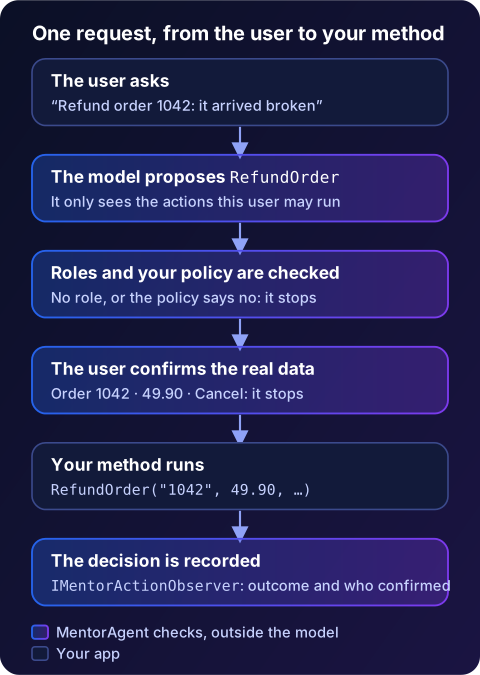
The result. The model proposes; your rules decide. A good way to start is with read-only actions: they are useful from day one and need no confirmation. Write actions follow when the roles are in place.
Read more in governance.
Specialists and teams
Section titled “Specialists and teams”The problem. One agent with fifty tools gets confused, and some decisions need more than one look.
What MentorAgent does. Three levels, all declared with attributes:
- Actions, with
[MentorAction]. - Specialists, with
[MentorAgent]: agents with their own instructions and actions, reached through a handoff workflow. - Teams, with
[MentorTeam]and[TeamMember]: a group chat that approves or rejects a decision. When it approves, the coordinator can route the work to a specialist.
Agents can also be described in YAML with Novior.MentorAgent.Declarative. Everything is built on the handoff and group chat orchestrations of Microsoft Agent Framework.
The result. Focused agents, each with a short list of tools, and decisions that pass through review before anything changes.
Read more in agent levels.
Pages and skills
Section titled “Pages and skills”The problem. An assistant in a box in the corner doesn't know where the user is, and a long system prompt full of policies costs tokens on every call.
What MentorAgent does.
[MentorPage]lets the agent take the user to a page of your app; throughIMentorPageContext, the page shares what the user is looking at and offers actions on the interface.[MentorSkill]packages knowledge, such as a return policy, that the model loads only when it needs it (withEnableSkillson).
The result. An agent that feels part of the application, with a smaller context.
Cost control
Section titled “Cost control”The problem. Every model call has a price, and an agent makes many.
What MentorAgent does. Each lever is an option, off by default; a dashboard shows the result.
- Routing between a small model and a strong one, by your rule, by a classifier, by semantic similarity or in cascade (for non-streaming calls).
- Tool filtering sends only the most relevant actions to the model.
- Compaction trims long conversations before each call.
- Rate limits per signed-in user.
- A Blazor dashboard for usage and cost, with the model prices you configure.
The result. Costs you can see, and levers to keep them down.
Observability
Section titled “Observability”The problem. When an agent calls tools on behalf of users, you need to see what happened, next to the rest of your telemetry.
What MentorAgent does. With EnableObservability, MentorAgent emits OpenTelemetry spans for turns and tool calls, and counters for turns, tool calls, errors and guardrail blocks. Whatever the option, logs of role refusals and MCP calls identify the caller by a fingerprint, not by name. The confirmation events are available for you to record who approved what. The library sends no telemetry of its own to its authors.
The result. The agent shows up in the same traces and dashboards as the rest of your application.
Cloud or local models
Section titled “Cloud or local models”The problem. Models change every few months, and some data must not leave the company.
What MentorAgent does. The model is an IChatClient from Microsoft.Extensions.AI: Azure OpenAI and OpenAI, or Ollama and other servers with an OpenAI-compatible API. You can also pass your own Agent Framework AIAgent, such as a Foundry agent; specialists, teams and remote agents are not available in that case. MentorAgent doesn't bundle a provider; you add the package for the one you choose, for example Microsoft.Extensions.AI.OpenAI. With a local model, the conversation and the data your actions read stay inside your network, except what you choose to send to remote MCP servers or agents.
The result. The model becomes a replaceable part, in the cloud or on your own machines, without touching the actions.
Wherever your users are
Section titled “Wherever your users are”The problem. Users are in the browser, in a mobile app, in an AI assistant, or are other systems altogether. Building one assistant per channel multiplies the work and the rules.
What MentorAgent does. Your actions and their rules are the same on every channel:
- Web: Blazor Server and Blazor WebAssembly or Auto get a ready-made
<ChatWidget />. React, Angular, Vue or plain JavaScript connect to the SignalR hub with@microsoft/signalr. - Mobile: a .NET MAUI app on Android or Windows uses the same widget; native apps use the official SignalR clients for Java on Android and Swift on iOS.
- AI assistants: as an MCP server, your actions become tools for MCP clients, such as the AI assistants in the IDE or on the desktop.
- Other agents: as an A2A server, your whole agent becomes a peer that agents written in other languages can call.
- Scripts and services: where no SignalR client fits, such as a Python script, a shell or a service in another language, Server-Sent Events work with any HTTP client.
On the server, a few calls set up every transport:
using Novior.MentorAgent.Extensions;
using Novior.MentorAgent.Server.Extensions;

// In AddMentorAgent: options.McpServerEnabled = true; options.A2AServerEnabled = true;
builder.Services.AddMentorAgentServer();   // hub, SSE, MCP and A2A services

var app = builder.Build();

app.MapMentorAgentServer(configureTransports: endpoints => endpoints.RequireAuthorization());
app.MapMentorAgentMcp(configure: endpoints => endpoints.RequireAuthorization());
app.MapMentorAgentA2A(configure: endpoints => endpoints.RequireAuthorization());
The rules follow the channel. An MCP client has nobody to click "Confirm", so MCP publishes only the actions that need no confirmation. Role-protected actions appear only when you identify the caller with McpCallerPrincipal and the caller holds the role. The A2A card leaves out both kinds.
The result. One agent to build and govern, wherever your users are.
Read more in channels.
Where it runs
Section titled “Where it runs”MentorAgent is a .NET 10 library that runs inside your application, an ASP.NET Core host or a .NET MAUI app, so it goes wherever that application goes: Windows or Linux, a container, the cloud, or your own servers. The widget loads nothing from third-party servers. The core is .NET; everything around it, from the front ends to the tools and agents it talks to, can be written in other languages.
Where it fits
Section titled “Where it fits”Existing .NET systems that become AI-ready. Once on .NET 10, a management system, a back office or a customer portal already holds years of business rules. Marking the right service methods is enough to give it an agent, without a rewrite and without a second copy of the logic.
Internal copilots for operators. Customer care, sales, logistics or administration staff ask in plain language and the agent finds the order, the contract or the case, then prepares the next step. Read-only actions answer at once; the actions that change data wait for the operator's confirmation.
Assistants for end customers. In an online store, a utility's customer area or a booking portal, customers check the status of an order, a request or a delivery, and start simple operations. Only the actions you choose are visible, and the roles decide who can do what.
Back-office automations with a human in the loop. Refunds, credit notes, address changes, record corrections: the agent prepares the operation with its real arguments, and a person approves it. A team of agents can review the request first, so the operator sees a decision that has already been checked.
Agents that work across companies. A retailer's agent asks the carrier's agent where a parcel is; a supplier's agent checks the stock of a customer. With A2A, each company keeps its own agent, its own rules and its own data, and they talk to each other in natural language. Only actions that need no confirmation are open to the other side, and roles count only for callers you authenticate.
Company tools for employees' AI clients. Many employees already use AI assistants in the editor or on the desktop. Through MCP, the company's own actions become tools for those assistants, but only the ones that need no confirmation, and the role-protected ones only for callers you identify.
Software vendors. A team that sells a .NET product can add an agent to it once and offer it to every customer, each installation configured with the customer's model, in the cloud or on their own servers.
Regulated sectors. Finance, insurance, healthcare and the public sector need to know who did what and why. Roles and confirmations are enforced in code, with EnableObservability every tool call becomes an OpenTelemetry span, every decision on an action, with who confirmed it, can feed your own audit records, and a local model keeps the data at home.
Mobile and field apps. The same agent in a .NET MAUI app on Android or Windows, or in a native app through the Java and Swift SignalR clients.
What becomes possible
Section titled “What becomes possible”When an agent can use the systems a company already has, under the company's own rules, and reach its users wherever they are, the application gains a new interface, and the business logic a new reach:
- Every service method is one attribute away from being a capability of the agent, with the same rules for every caller.
- The same gate on every channel: the widget, a mobile app, a script, an IDE assistant or another company's agent: roles are checked for every caller, and where nobody can confirm, the actions that need confirmation are not offered.
- The model becomes a replaceable part: a cloud model today, a local one tomorrow, a small one for easy turns and a strong one for hard ones, without touching the actions.
- Adoption can grow step by step: read-only actions first, then writes with confirmation, then specialists and teams for the decisions that need them.
- The systems of a company become reachable by the agents of its partners, through open standards and on its own terms.
What stays in your code
Section titled “What stays in your code”- Data permissions: MentorAgent checks roles. Which records a user may see or change is decided by your code: in your methods, or in an
IMentorActionPolicythat MentorAgent asks before every call. ReadOnlyis trusted: if a method marked read-only writes, nothing stops it.- Only
[MentorAction]has rules: a method exposed with a plain[Description]has no roles and asks no confirmation, unlessRequiresApprovalnames it. A warning lists them the first time MentorAgent reads your actions. - Audit: every decision on an action, who confirmed it included, reaches an
IMentorActionObserverfor you to record. The library doesn't keep an audit store of its own.
What's next
Section titled “What's next”MentorAgent is the foundation. The project is working on a console to see, try, configure and govern the agents of each application, and on a ready-made installation that runs everything on your own servers, local model included. Each will be announced here when it's ready.
Follow the updates: the blog's RSS feed brings every announcement to your feed reader, and on GitHub (external site) Watch → Custom → Releases sends you a notification for every new version.
Get started
Section titled “Get started”Written with the help of AI; code and facts checked by the MentorAgent team.