The AI agents of your applications, under your control.
Your app's methods, MCP tools and A2A agents become one agent that you govern with your rules. Take it to the web, mobile apps, AI assistants and other agents.
publicclassCaseService(ICaseStore store)
{
[MentorAction( Description = "Adds a note to a case", RequiredRoles = ["Operators"])]publicTask AddNote(string caseNumber, string text)
=> store.AddNoteAsync(caseNumber, text);
}
.NET 10 LTS · Blazor and MAUI Hybrid · React, Angular, Vue and mobile apps · MCP and A2A
From your systems to wherever your users are
MentorAgent runs inside your .NET application. It takes what your systems already do, applies your rules, and brings the same agent to every place your users work: the browser, a phone, an AI assistant, another agent or a script.
Your systems
.NET methods[MentorAction]
MCP toolsfrom MCP servers
A2A agentson other hosts
MentorAgent
The application layer for AI agents
Governance
Specialists and teams
Pages and skills
Cost control
Observability
Cloud or local models
Wherever your users are
WebBlazor, React, Angular, Vue
MobileMAUI (Android, Windows), native iOS and Android over SignalR
AI assistantsMCP
Other agentsA2A
Scripts and servicesHTTP, SSE
Open beyond .NET
The core is .NET; what surrounds it can be written in other languages. Front ends connect through SignalR or Server-Sent Events; tools and agents through MCP and A2A, which have official SDKs for Python, JavaScript, Java, Go and more.
Installs where your app runs
It's a library inside an ASP.NET Core app on .NET 10: Windows or Linux, a container, the cloud or your own servers. It sends no telemetry to its authors.
Your model, cloud or local
Azure OpenAI, OpenAI, or a local model with Ollama. With a local model, the conversation and the data your actions read stay inside your network.
Govern your agents the way you govern your application
Your code decides what the agent can do. Who may run each action, what needs a confirmation, which limits apply and what it costs: you declare it in C#, next to your methods, and MentorAgent applies it on every channel. A rule in a prompt can be talked around; a check in your code cannot.
Who can do what
Each action lists in RequiredRoles the roles that may run it. MentorAgent checks them against the signed-in user before anything else: without the role, the model is not even offered the action. For rules per company or per record, MentorAgent asks your own IMentorActionPolicy before every call.
A confirmation before changes
A [MentorAction] that changes data asks the user first and shows the values it is about to use. Actions that only read declare ReadOnly = true and run straight away.
The same rules on every channel
Widget, SignalR hub, SSE, MCP and A2A apply the same checks. Where nobody can confirm, as over MCP and A2A, actions that need a confirmation are not offered.
Limits and checks
Messages per user and their length, questions outside your application, checks on incoming messages and on replies. You set each one in the options.
Costs in view
Only the tools a message needs reach the model, long conversations are shortened, and the stronger model answers only the turns that need it. A dashboard shows tokens and estimated cost per model.
Visible in your monitoring
Turns, tool calls, errors and blocked messages go to OpenTelemetry as traces and metrics, following the conventions for generative AI, into the tools you already use. Every decision on an action, who confirmed it included, also reaches an IMentorActionObserver of yours.
What happens when the user asks the agent to change data
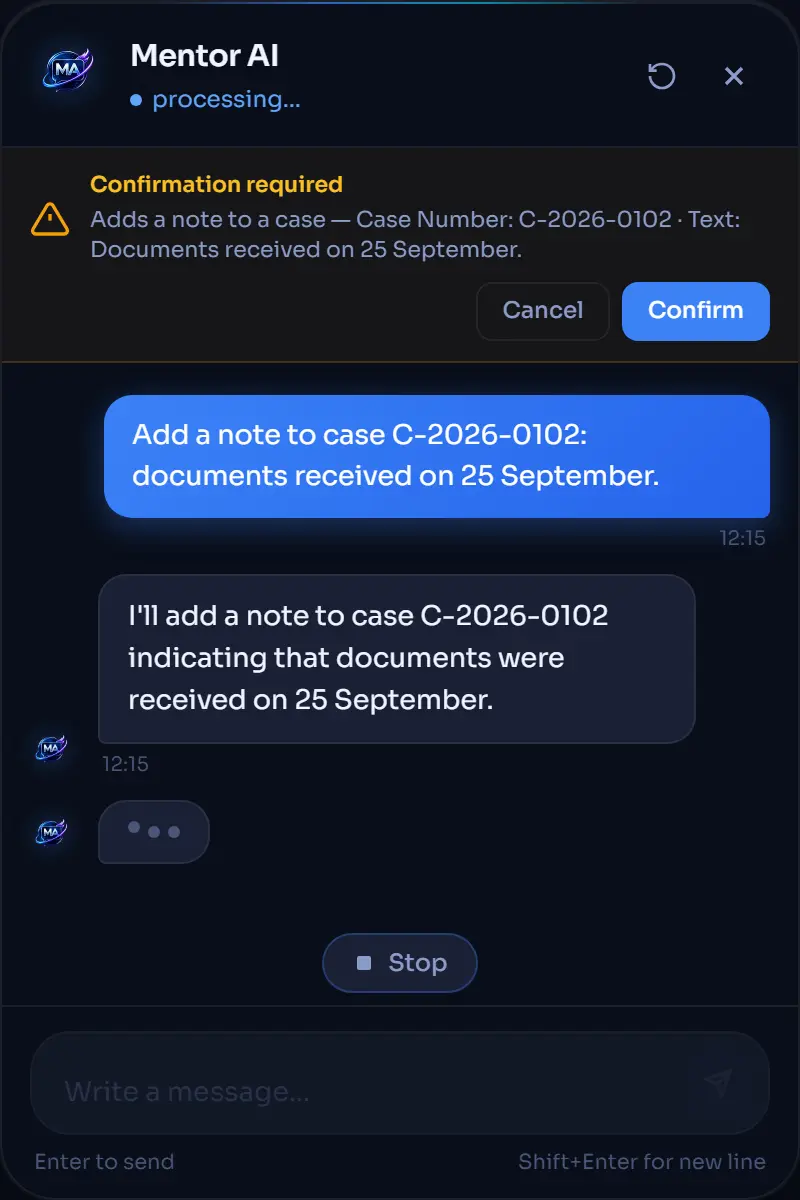
Add a note to case C-2026-0102: documents received on 25 September.
User in the Operators role
Role Operators: present · add_note is offered to the model
I can add that note. Please check the details and confirm.
◆ Confirmation required
Adds a note to a case — Case Number: C-2026-0102 · Text: Documents received on 25 September.
Nothing changes until you confirm.
CancelConfirm
Confirmed: AddNote runs and the note is saved.
Cancelled: AddNote does not run, nothing changes, and the model is told it was declined.
User without the role
Role Operators: missing · add_note is not offered to the model
I can't add notes to cases: it is not among the actions I have.
No box, no change: a call made anyway is refused before any question.
Try it as
Add a note to case C-2026-0102: documents received on 25 September.
Role Operators: present · add_note is offered to the model
I can add that note. Please check the details and confirm.
◆ Confirmation required
Adds a note to a case — Case Number: C-2026-0102 · Text: Documents received on 25 September.
Nothing changes until you confirm.
Confirmed: AddNote runs and the note is saved.
Done: the note is on case C-2026-0102.
Cancelled: AddNote does not run, nothing changes, and the model is told it was declined.
OK, I did not add the note.
Role Operators: missing · add_note is not offered to the model
I can't add notes to cases: it is not among the actions I have.
No box, no change: a call made anyway is refused before any question.
Sample data; the model's replies are examples. Title, text and buttons of the box are the widget's; the other lines summarize what the library does.
What stays in your code. What you don't declare stays open: without RequiredRoles anyone who reaches the agent can call the action, and a method with [Description] alone never asks. Roles are checked per action: who may touch which record is decided by your code, in your methods or in an IMentorActionPolicy. The hub, SSE, MCP and A2A endpoints are open until you protect them.
OpenAI, Azure OpenAI, Foundry or a local model such as Ollama. Simple questions go to a cheaper model, the dashboard shows what each one costs, and every turn can be traced with OpenTelemetry.
The code on this page compiles against 1.2.0, and the quickstart was last run on 27 October 2026.
Already using Microsoft Agent Framework?
MentorAgent is built on Agent Framework 1.26.0 and does not hide it: it configures it for you, and accepts an AIAgent you build yourself. Agent Framework brings agents, workflows and tool approval; MentorAgent adds the application layer shown in the diagram.
Your applicationC# methods with attributes · Blazor pages · ASP.NET Core users and roles
MentorAgenttool discovery · prompt, memory, RAG · roles and confirmation · widget, hub, SSE, MCP, A2A · cost and routing
Microsoft Agent Framework 1.26.0agents · handoff and group-chat workflows · function calling · approvals
The modelan IChatClient or an AIAgent, with tool calling: Azure OpenAI, OpenAI, Ollama, Foundry
Tools and datadatabases and internal APIs · MCP servers · remote A2A agents
A good fit if
you have a .NET 10 app (Blazor Web App, ASP.NET Core or MAUI Hybrid) and, if you need roles, ASP.NET Core authentication;
you want the agent to use your application's own methods, not an API built just for it;
some actions write data and you want the user's confirmation;
you need the same agent on several clients, or exposed over MCP and A2A.
Not a good fit if
you are on .NET 8 or 9;
you only need a document chatbot with no actions: Microsoft.Extensions.AI or Agent Framework is enough;
you need a workflow engine with persistent state and compensation.
Latest: 1.2.0,
published on NuGet on
(UTC)
· Release notes
Stable since 1.0.0: breaking changes come only in a new major version (Semantic Versioning).
Planned
Answers grounded in your documents, even large archives
Models on your own machines, and a measure of how good the answers are
One app, many customers: separate data and limits for each
More ways to give the agent actions, including the APIs you already have
Interface actions under the same rules as every other action
React and Angular on a par with Blazor: the agent works in your front end too
Clear costs: what each agent and each user spends
Works with the AG-UI standard and its clients
A widget everyone can use, under the European accessibility standard
Coming soon: a console to manage the MentorAgent agents in your applications.
Frequently asked questions
Can I use it in a commercial product?
Yes: the Apache License 2.0 allows it, in paid software too. When you redistribute it, include a copy of the license and the NOTICE file that comes with it, as the license page explains.
The model provider receives the conversation, the user's name and roles, the page context and what your actions return; remote MCP servers and A2A agents receive the requests you delegate to them. The library sends no telemetry to its authors, and the documentation lists everything that leaves.
Does it work with local models?
Yes, through an OpenAI-compatible endpoint such as Ollama, as long as the model supports tool calling (local models).
How mature is it?
It is stable: 1.2.0, published on 27 October 2026 (UTC), is the latest of 23 versions on NuGet since 22 June 2026, and from 1.0.0 breaking changes come only in a new major version. Up to 1.0.0-rc.15 the packages were called MentorAgent.*. What changed in this version and what is still open is in the release notes for 1.2.0; every version is in the release notes.
Does it run on .NET 8 or 9?
No: it requires .NET 10, the LTS release Microsoft supports until 14 November 2028 (requirements). .NET 8 and .NET 9 reach end of support on 10 November 2026.
What does it cost?
The library is free: you pay your model provider, or run a local model.
Do I need Blazor?
No: Blazor is needed only for the ready-made widget. With Novior.MentorAgent.Server, React, Angular, Vue or mobile clients use a SignalR hub or SSE, and you write the UI (your own front end).
Do I need .NET everywhere?
No: only the application that hosts the agent runs on .NET 10. Front ends, tools and other agents can be written in other languages and connect over SignalR, SSE, MCP or A2A (channels).
Which versions get fixes?
The latest minor gets every fix; the previous minor gets security fixes for 3 months, the previous major for 6. Support and versions has the details.
Documentation
Guides, concepts and reference, checked against 1.2.0.