
AI Under Your Control · Part 1
From Microsoft Agent Framework to a governed AI agent in your .NET app
Agent Framework runs the agent. MentorAgent puts roles, human-in-the-loop confirmation, a record of every decision and cost control around it, on the methods of your own app. The same refund built both ways, and where we take it next.

In this article
You have a .NET application with users, roles and services. Now you want an assistant inside it that does real work: it refunds an order, changes an address, closes a ticket. The model is the easy part. The hard part is that nobody may lose control while it works. The right person asks. The right person confirms. The action runs only for someone who is allowed to run it. And afterwards you can say who did what.
Microsoft Agent Framework is a very good base for this, and it is the base MentorAgent is built on: MentorAgent 1.3.0 runs on Agent Framework 1.27.0. The framework gives you agents, tools, workflows, middleware, model providers, tool approval (human in the loop) and the protocols to talk to other agents, in .NET, Python and Go. What it leaves to you is everything that makes an agent part of your application instead of a demo next to it: your users, your roles, your screens and your records.
This article measures that distance with one example, a refund, built twice. First with Agent Framework alone, with the code you really need before you can put it in front of customer care. Then with MentorAgent. After that, what the difference gives a team that has to answer for the result, and where we are taking MentorAgent next.
The same refund, built twice
Section titled “The same refund, built twice”The rules of the refund are easy to say:
- Only users with the
CustomerCarerole can refund. - The assistant never refunds on its own. A person gives a confirmation (tool approval, human-in-the-loop) and sees the real order and the real amount.
- The role is checked again when the person confirms, because it may have changed in between.
- Every step is recorded: who asked, who confirmed, what happened.
- Other agents can read the status of an order over MCP, if their caller has the role. Nobody can click "Confirm" on MCP, so the refund is not offered there.
With Agent Framework alone: roles, human in the loop and a record
Section titled “With Agent Framework alone: roles, human in the loop and a record”Roles are the first question teams ask about Microsoft Agent Framework. The framework runs the agent and the approval flow; which of your users may trigger a tool is a rule you write. It has the pieces for it. A tool wrapped in ApprovalRequiredAIFunction makes the run stop and hand you a request instead of calling the method. Function calling middleware lets you look at every call. A session keeps the conversation. Here is what you assemble from them, following the pages on tool approval (external site) and middleware (external site).
First the tool. The method does the work, and the wrapper makes the agent stop and ask before it runs:
using Microsoft.Extensions.AI;

public sealed class RefundTools(IOrderStore store)
{
    public AIFunction Create() => new ApprovalRequiredAIFunction(
        AIFunctionFactory.Create(RefundOrder, "RefundOrder", "Refunds an order, fully or in part"));

    private async Task<string> RefundOrder(string orderNumber, decimal amount)
    {
        await store.RefundAsync(orderNumber, amount);
        return $"Order {orderNumber}: refund of {amount:0.00} registered.";
    }
}
Then the role. A table says which role each tool needs, and function calling middleware checks it. The middleware runs when the tool is about to run, which is after the person has confirmed, so it is also the second check. The table is closed by default: a tool that is not in it is refused.
using System.Security.Claims;
using Microsoft.Agents.AI;
using Microsoft.AspNetCore.Http;
using Microsoft.Extensions.AI;

public static class ToolRoles
{
    private static readonly Dictionary<string, string> Required = new() { ["RefundOrder"] = "CustomerCare" };

    // A tool that is not in the table is refused: the default is closed
    public static bool MayCall(ClaimsPrincipal? user, string tool) =>
        Required.TryGetValue(tool, out var role) && user?.IsInRole(role) == true;
}

public sealed class RefundGuard(IHttpContextAccessor http, DecisionLog log)
{
    // Function calling middleware: it runs when the tool is about to run, so after the user has confirmed
    public async ValueTask<object?> CheckRoleAsync(
        AIAgent agent,
        FunctionInvocationContext context,
        Func<FunctionInvocationContext, CancellationToken, ValueTask<object?>> next,
        CancellationToken cancellationToken)
    {
        var user = http.HttpContext?.User;
        var tool = context.Function.Name;

        if (!ToolRoles.MayCall(user, tool))
        {
            log.Record(new Decision("blocked", tool, user?.Identity?.Name));
            return "Refused: the signed-in user may not use this action.";
        }

        var result = await next(context, cancellationToken);
        log.Record(new Decision("executed", tool, user?.Identity?.Name));
        return result;
    }
}
Now the assistant, the part the front end talks to. It builds the agent with the tool and the middleware, runs the user's message on the session, and turns an approval request into something the front end can show: the tool and its real arguments, from the FunctionCallContent. The question is asked only if the user may use the action. If not, nobody is asked, and Agent Framework rejects the unanswered request on the next run.
Part of the protection is already in the framework. Agent Framework 1.27.0 records every approval request in the session, honors a response only if it matches one of them, and only once, runs the call with the arguments that were shown, and rejects the requests left unanswered. What it cannot know is who is answering. So the assistant accepts an answer only from the owner of the conversation, and refuses one for a request that is not waiting, so that the record never says "approved" for an answer the framework would ignore.
using System.Security.Claims;
using Microsoft.Agents.AI;
using Microsoft.Extensions.AI;

public sealed class RefundAssistant(
    IChatClient chatClient, RefundTools tools, RefundGuard guard, ConversationStore conversations, DecisionLog log)
{
    private readonly AIAgent agent = chatClient
        .AsAIAgent(instructions: "You help the customer care team with refunds.", tools: [tools.Create()])
        .AsBuilder()
        .Use(guard.CheckRoleAsync)
        .Build();

    public async Task<ChatReply> AskAsync(ClaimsPrincipal user, string? conversationId, string text, CancellationToken ct)
    {
        var id = conversationId ?? Guid.NewGuid().ToString("N");
        var conversation = conversations.TryGetValue(id, out var existing)
            ? existing
            : conversations[id] = new Conversation(user.Identity!.Name!, await agent.CreateSessionAsync(ct));
        EnsureOwner(conversation, user);
        conversation.Pending = null;

        var response = await agent.RunAsync(text, conversation.Session, cancellationToken: ct);
        return Reply(id, conversation, user, response);
    }

    public async Task<ChatReply> AnswerAsync(
        ClaimsPrincipal user, string conversationId, string requestId, bool approved, CancellationToken ct)
    {
        if (!conversations.TryGetValue(conversationId, out var conversation)) throw new KeyNotFoundException();
        EnsureOwner(conversation, user);
        // Agent Framework would ignore a stale answer; refusing it here keeps the record from saying "approved"
        if (conversation.Pending is not { } request || request.RequestId != requestId)
            throw new InvalidOperationException("There is no such request waiting for an answer.");
        conversation.Pending = null;

        var call = (FunctionCallContent)request.ToolCall;
        log.Record(new Decision(approved ? "approved" : "rejected", call.Name, user.Identity?.Name, conversationId));

        var answer = new ChatMessage(ChatRole.User, [request.CreateResponse(approved)]);
        var response = await agent.RunAsync(answer, conversation.Session, cancellationToken: ct);
        return Reply(conversationId, conversation, user, response);
    }

    private ChatReply Reply(string id, Conversation conversation, ClaimsPrincipal user, AgentResponse response)
    {
        var request = response.Messages.SelectMany(m => m.Contents).OfType<ToolApprovalRequestContent>().FirstOrDefault();
        if (request is null) return new ChatReply(id, response.Text, null);

        var call = (FunctionCallContent)request.ToolCall;
        if (!ToolRoles.MayCall(user, call.Name))
        {
            // Nobody is asked. The request stays unanswered and the next run rejects it
            log.Record(new Decision("not offered", call.Name, user.Identity?.Name, id));
            return new ChatReply(id, "You may not use this action.", null);
        }

        conversation.Pending = request;
        log.Record(new Decision("asked", call.Name, user.Identity?.Name, id));
        return new ChatReply(id, null, new PendingApproval(request.RequestId, call.Name, call.Arguments));
    }

    private static void EnsureOwner(Conversation conversation, ClaimsPrincipal user)
    {
        if (conversation.Owner != user.Identity?.Name) throw new UnauthorizedAccessException();
    }
}
That is the heart of it. Around it sit five more pieces, each simple, each yours:
- The record (16 lines): who asked, who confirmed, what ran and what was blocked. In production, a table you can query.
- The conversations (12 lines): the session, its owner and the pending request, kept between the two HTTP requests of a confirmation.
- Two endpoints (25 lines): one for the message, one for the person's answer, with the errors mapped to HTTP.
- The MCP server (15 lines), with the official C# SDK,
ModelContextProtocol: an MCP client has nobody to confirm, so only the read of the order status is published, and the tool checks the caller's role itself. - The registration in
Program.cs(16 lines) that ties it all together.
The full version, which we compiled and tested, is 180 lines of C# in eight files, counting every line that is not blank or a comment, braces and using lines included. Agent Framework's hosting packages, still prerelease in .NET, can take over part of the plumbing: a session store isolated by the signed-in user's claim can replace the conversation store and its owner check, and if your front end speaks AG-UI, MapAGUIServer can replace the two endpoints. The role table, the middleware, the choice of who is asked and the record stay yours either way.
Each new action to protect, an address change or a cancellation, means a new tool, a new line in the role table and, if other agents need it, a new MCP tool with its own role check. It is good code, and it is your code to maintain.
With MentorAgent: the rules on the method
Section titled “With MentorAgent: the rules on the method”MentorAgent starts from the methods you already have. This is the whole refund, and the read for other agents:
using Novior.MentorAgent.Attributes;

public class OrderService(IOrderStore store)
{
    [MentorAction(Description = "Refunds an order, fully or in part", RequiredRoles = ["CustomerCare"])]
    public async Task<string> RefundOrder(string orderNumber, decimal amount)
    {
        await store.RefundAsync(orderNumber, amount);
        return $"Order {orderNumber}: refund of {amount:0.00} registered.";
    }

    [MentorAction(Description = "Returns the status of an order", ReadOnly = true, RequiredRoles = ["CustomerCare"])]
    public Task<string> GetOrderStatus(string orderNumber) => store.GetStatusAsync(orderNumber);
}
The attribute says what the action is for and who may use it. RequiredRoles is checked with ClaimsPrincipal.IsInRole on the signed-in user: a user without the role is never offered the action, and the role is checked again after the user confirms. A [MentorAction] asks for confirmation unless it declares ReadOnly = true, as the read does, or RequiresConfirmation = false. The question the user sees is built from the real call: the description of the action, then the arguments.
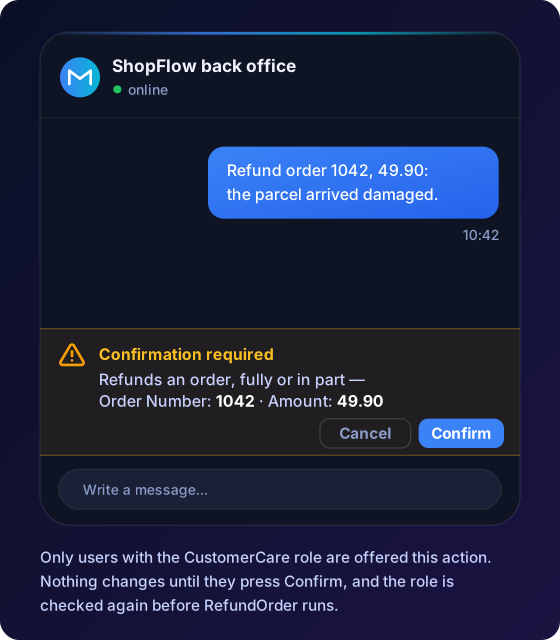
The registration lists where the actions are, which model to use and which channels to open. Here the same app serves the SignalR hub and Server-Sent Events for your own front end, and an MCP endpoint:
using Microsoft.AspNetCore.Http;
using Microsoft.Extensions.AI;
using Novior.MentorAgent.Extensions;
using Novior.MentorAgent.Options;
using Novior.MentorAgent.Server.Extensions;
using OpenAI;

builder.Services.AddScoped<OrderService>();

builder.Services.AddMentorAgent(options =>
{
    options.AppName = "ShopFlow back office";
    options.ScanAssemblies = [typeof(Program).Assembly];
    options.ChatClient = new OpenAIClient(builder.Configuration["OpenAI:Key"]!)
        .GetChatClient("gpt-4o-mini")
        .AsIChatClient();
    options.McpServerEnabled = true;
});

// On MCP, the signed-in caller of the request decides which actions with roles are published
builder.Services.AddOptions<MentorOptions>()
    .Configure<IHttpContextAccessor>((options, http) => options.McpCallerPrincipal = () => http.HttpContext?.User);

builder.Services.AddMentorAgentServer();
builder.Services.AddMentorActionObserver<DecisionObserver>();

var app = builder.Build();

app.MapMentorAgentServer(configureTransports: endpoints => endpoints.RequireAuthorization());
app.MapMentorAgentMcp(configure: endpoints => endpoints.RequireAuthorization());
On MCP the refund is not published: it needs a confirmation, and an MCP client has nobody to click "Confirm". The read is published, but only to callers who hold the role. On the hub, the answer to a confirmation is accepted only from the user who opened the connection; over Server-Sent Events the action id is the key, so keep the endpoints authenticated, as here. You did not write any of these rules: they follow from the attribute and the channel.
The record of the decisions is a class the library calls for every decision of its gate, with who asked, who confirmed and the outcome:
using Microsoft.Extensions.Logging;
using Novior.MentorAgent.Abstractions.Interfaces;
using Novior.MentorAgent.Abstractions.Models;

public sealed class DecisionObserver(ILogger<DecisionObserver> logger) : IMentorActionObserver
{
    public ValueTask OnDecisionAsync(MentorActionDecision decision, CancellationToken cancellationToken)
    {
        logger.LogInformation("{Outcome} {Tool}: asked by {User}, confirmed by {ConfirmedBy}",
            decision.Outcome, decision.ToolName, decision.User?.Identity?.Name, decision.ConfirmedBy?.Identity?.Name);
        return ValueTask.CompletedTask;
    }
}
That is 180 lines against 48, counted the same way. The dialog that shows the question is in neither count: in Blazor and MAUI it is MentorAgent's widget, the one in the picture, while a React or Angular front end draws its own in both cases. The numbers are not the point. The places are. With Agent Framework alone, the rules of one refund are spread over a tool, a role table, a middleware, an assistant, two endpoints and an MCP class. With MentorAgent they live on the method, in the code that does the work, and the same method serves the chat and MCP.
Agent Framework alone is the right choice when you work in Python or Go, when you design the workflow yourself as a graph or build the orchestration by hand, or when you build agents without an application around them. MentorAgent is for the case in this article: an agent inside a .NET app that has users.
AI agent governance in .NET: what you get for it
Section titled “AI agent governance in .NET: what you get for it”Governance is a big word for a simple demand: the assistant must obey the same rules as the people who use it, and you must be able to show it. Three things carry that demand in MentorAgent.
The rules live on the method
Section titled “The rules live on the method”The rule about who may refund, and whether a person must confirm, is not in a prompt that a model may or may not follow, and it is not spread across middleware and endpoints that someone must remember to update. It sits on the method, in the code that does the work. Read the method and you read its rules. Review the method and you review the control. When the method is renamed or moved, its rules move with it.
The default is safe too. An action that changes data asks for confirmation unless it says otherwise, and a method exposed with only a description, which has no rules at all, gets a warning in the log unless it is declared read-only, so the gap is visible.
The identity of your app decides who can do what
Section titled “The identity of your app decides who can do what”MentorAgent does not invent a second set of users. It reads the identity your app already has, the signed-in ClaimsPrincipal, and uses the roles it already carries. The same rule then holds on every channel. In the chat widget, a user without the role never sees the action. On MCP, the actions that need a role are offered only to callers the server can identify, and the ones that need a confirmation are not offered at all. For other agents calling yours over A2A, the same: where nobody can answer a confirmation, the action is not on offer.
Your own business rules fit in the same gate. A policy can allow, ask for confirmation, or stop a call depending on your data: this customer, this amount. And the decisions go to your record, the whole sequence, with who asked and who confirmed.
Costs and models stay under your control
Section titled “Costs and models stay under your control”An agent that works well in a demo can cost a lot in production, because every message carries the whole conversation and every tool definition. MentorAgent has the levers for it, and every one of them is off until you turn it on. It can send only the hard questions to a stronger model. It can send the model only the tools that match the message. It can compact long conversations. It can limit the requests of each user. And a dashboard of tokens and costs is a component you place on an admin page. You choose the model provider, and you keep the choice.
Agent Framework in Blazor, MAUI and any front end
Section titled “Agent Framework in Blazor, MAUI and any front end”For Blazor, <ChatWidget /> works in Blazor Server, WebAssembly and Auto, and in .NET MAUI apps on Android and Windows, with the confirmation dialog included. React, Angular, Vue and other clients connect over SignalR or Server-Sent Events, and send the confirmations back with POST /mentor/approve. Behind it, the specialists you declare and the teams of agents that discuss a request before answering run as Agent Framework handoff and group chat workflows, and their tools keep the same role and confirmation checks. If your workflows expect the framework's own approval flow, HitlMode = Native wraps the coordinator's tools in ApprovalRequiredAIFunction, and the user sees the same confirmation.
Where MentorAgent is going
Section titled “Where MentorAgent is going”Agent Framework keeps growing, and MentorAgent follows it: today on 1.27.0, with MentorAgent 1.3.0, adding the application layer that each step of the framework makes more useful. What follows is decided work. It pushes in one direction: the agent becomes a native part of your application, not a component attached to it.
More ways to give the agent its actions. The attribute is the simplest way, and it will not be the only one. A team with a clean architecture should be able to describe the actions of an agent in other ways, for example with a fluent registration, with the commands and queries the application already has, and with the APIs it already exposes. Then an agent can be added to an app that was not written for one, without putting attributes on every service. The rules stay the same everywhere: roles, confirmation, record.
The actions of the interface under the same rules. What the agent does on the screen, not only in your services, will follow the same roles, the same confirmation and the same record as every other action.
React and Angular on a par with Blazor. Today they connect over SignalR or Server-Sent Events and draw their own screen. The goal is an agent that works in your front end as well as it does in Blazor.
Compatibility with the AG-UI standard and its clients. Agent Framework has an AG-UI integration, still prerelease in .NET. MentorAgent will work with that standard and with the clients built for it, so the choice of front end does not lock you to one library.
Then, in brief:
- Compare two models on your own test cases before you switch, and stop the release if the new one does worse.
- Clear costs, what each agent and each user spends.
- A widget everyone can use, under the European accessibility standard.
Two steps on this road have already shipped, with MentorAgent 1.3.0: answers from your own documents, also from a vector database such as pgvector, Qdrant or Azure AI Search, and one app for many customers, with data and limits kept apart for each. The release notes for 1.3.0 say what changes.
The thread is the same in all of them. Agent Framework gives the engine and moves fast. MentorAgent is the layer that turns that engine into part of your app, under your rules.
Read more
Section titled “Read more”- Roles, confirmation and governance: the checks, in order, and what stays in your code.
- MCP server: what is published, to whom, and why.
- Model providers: the chat client path, the
AIAgentpath and what differs. - The three agent levels: actions, specialists and teams on Agent Framework workflows.
- What is MentorAgent: the whole picture, in one page.
Get started
Section titled “Get started”Written with the help of AI; code and facts checked by the MentorAgent team.